
Skip to content
No results
  • Explore
    Explore Kinetic Market

    Browse Categories

    Apparel and Fashion
    Arts and Entertainment
    Automotive & Transportation
    Business to Business
    Cannabis and CBD
    Construction and Engineering
    Consulting and Strategy
    Consumer Services
    Ecommerce and Online Retail
    Education and Childcare
    Fitness and Wellness
    Food and Beverage
    Funeral & Memorial Services
    General Retail
    Grocery and Specialty Food
    Hair and Beauty
    Health Services
    Home and Building Services
    Legal and Financial
    Manufacturing and Wholesale
    Marketing and Creative
    Mental Health and Therapy
    Real Estate and Property
    Software and IT
    Explore All Categories →

    Legal and Financial

    Accounting and Bookkeeping
    Attorneys and Law Firms
    View All Legal and Financial →

    Arts and Entertainment

    Art Galleries
    Art Studios
    Dance
    Event Venues
    Museums
    Play Centers
    View All Arts and Entertainment →

    Food and Beverage

    Bakeries and Desserts
    Bar and Lounges
    Catering
    Coffee Shops and Cafes
    Juices and Smoothies
    View All Food and Beverage →

    Hair and Beauty

    Barbershops
    Beauty Supply
    Facials and Skincare
    Hair Products
    Makeup Artists
    Nail Salons
    Natural Hair and Locs
    Spa
    View All Hair and Beauty →

    Apparel and Fashion

    Bridal & Wedding
    View All Apparel and Fashion →

    Health Services

    Chiropractic Care
    Dental
    Home Care and Senior Services
    Veterinary Care
    View All Health Services →

    General Retail

    Florists
    Jewelry
    View All General Retail →

    Fitness and Wellness

    Massage Therapy
    View All Fitness and Wellness →

    Consumer Services

    Pet Services
    Professional Services
    View All Consumer Services →
  • Local
    • Add Business
  • Map
  • Pledge
  • Dashboard
    • Register
    • Login
Kinetic Market logo
  • Explore
    Explore Kinetic Market

    Browse Categories

    Apparel and Fashion
    Arts and Entertainment
    Automotive & Transportation
    Business to Business
    Cannabis and CBD
    Construction and Engineering
    Consulting and Strategy
    Consumer Services
    Ecommerce and Online Retail
    Education and Childcare
    Fitness and Wellness
    Food and Beverage
    Funeral & Memorial Services
    General Retail
    Grocery and Specialty Food
    Hair and Beauty
    Health Services
    Home and Building Services
    Legal and Financial
    Manufacturing and Wholesale
    Marketing and Creative
    Mental Health and Therapy
    Real Estate and Property
    Software and IT
    Explore All Categories →

    Legal and Financial

    Accounting and Bookkeeping
    Attorneys and Law Firms
    View All Legal and Financial →

    Arts and Entertainment

    Art Galleries
    Art Studios
    Dance
    Event Venues
    Museums
    Play Centers
    View All Arts and Entertainment →

    Food and Beverage

    Bakeries and Desserts
    Bar and Lounges
    Catering
    Coffee Shops and Cafes
    Juices and Smoothies
    View All Food and Beverage →

    Hair and Beauty

    Barbershops
    Beauty Supply
    Facials and Skincare
    Hair Products
    Makeup Artists
    Nail Salons
    Natural Hair and Locs
    Spa
    View All Hair and Beauty →

    Apparel and Fashion

    Bridal & Wedding
    View All Apparel and Fashion →

    Health Services

    Chiropractic Care
    Dental
    Home Care and Senior Services
    Veterinary Care
    View All Health Services →

    General Retail

    Florists
    Jewelry
    View All General Retail →

    Fitness and Wellness

    Massage Therapy
    View All Fitness and Wellness →

    Consumer Services

    Pet Services
    Professional Services
    View All Consumer Services →
  • Local
    • Add Business
  • Map
  • Pledge
  • Dashboard
    • Register
    • Login
Add Your Business →
Kinetic Market logo

Getting Started

2
  • How to add a listing
  • How to claim a listing

Listing Management

4
  • How to manage listing contact form
  • How to set your pricing category
  • FAQs, Business Highlights, and Business Hours
  • Managing your listing location

Account Management

2
  • How to Cancel A Subscription Plan
  • How to Change Your Subscription Plan
View Categories
  • Home
  • Help
  • Getting Started
  • How to claim a listing

How to claim a listing

2 min read

0:00 / 3:53
  • View as Markdown Open this page as plain Markdown (opens in a new tab)
  • Open in ChatGPT Ask questions about this page (opens in a new tab)
  • Open in Claude Ask questions about this page (opens in a new tab)
  • Open in Google AI Studio Ask questions about this page (Google account required) (opens in a new tab)

This article will provide you with step by step instructions on how to claim a listing on Kinetic Market. You can watch the video, read the article, or both. Whatever, you prefer.


Create or login to your account #

Create a free account or login to your account by clicking or tapping on “Account” in the main menu as shown

Navigation Menu

Search for your business name #

Search for your business by name in the search box on the home page as shown below. It’s recommended to put your business name in quotes to narrow down the search.

Search Box

Click the claim listing button #

In the left sidebar, you will see the claim box as shown in the image. Click or tap the “Claim Now” button.

Claim Box


Complete the claim form #

Complete and submit the claim form with your contact information and verification details. You do not have to provide proof at this point. For verification details, you can simply put that you are the owner of the listing. We will follow up for verification.

Claim Form

Wait for approval #

We will review your claim and contact you for verification within 24 hours. In the meantime, you can skip to the next step while you wait.


Subscribe to a plan #

Once you claim ownership of your listing, you must subscribe to a free or paid plan otherwise the listing will no longer be viewable on our website. On the checkout page, click or tap the “complete submission” button to complete the process.

Plan Selection Page

After you checkout, you will see a payment receipt with the button, “submit listing”. Ignore this button as it for new listing only. If you selected the free plan, it only comes with one listing and you will not be able to complete claim process if you create a new one. Instead, go back to your account by clicking or tapping on the “Account” button in the navigation again.
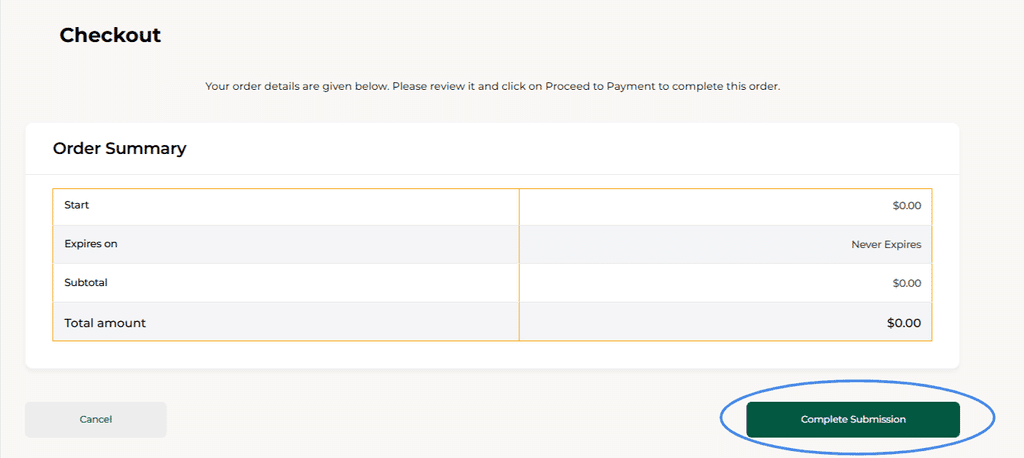
Checkout Page

Add listing to plan #

At this point, you should be on your dashboard. If not, click or tap “Account” in the navigation menu to be taken to your dashboard. The first thing you will see in your dashboard is an index of all your listings. You should see only the listing that you have claimed and it should say “no plan assigned”. For that listing, go all the way to the right-hand side and click on where it says “…More” as shown below.
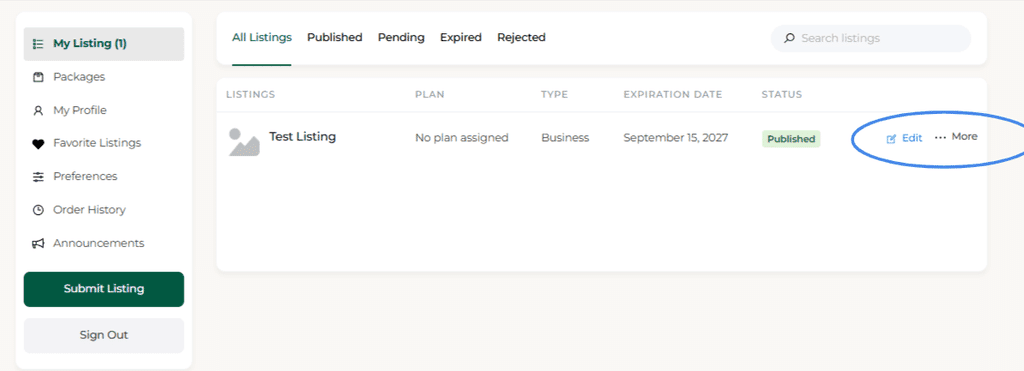
Listing Index -> More

A dropdown will appear and you will see “Assign Plan” as shown below. Click or tap it.
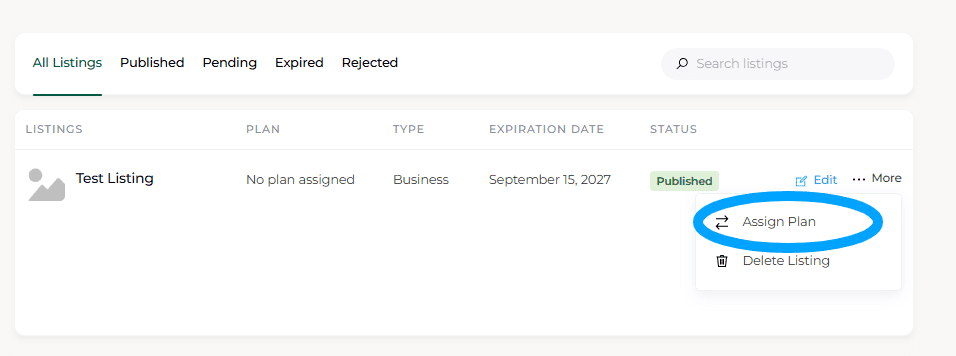
Listing Index -> More -> Assign Plan

A new modal will appear as shown below. You should see whichever plan you have subscribed to list. Click or tap the “Assign Plan” button.
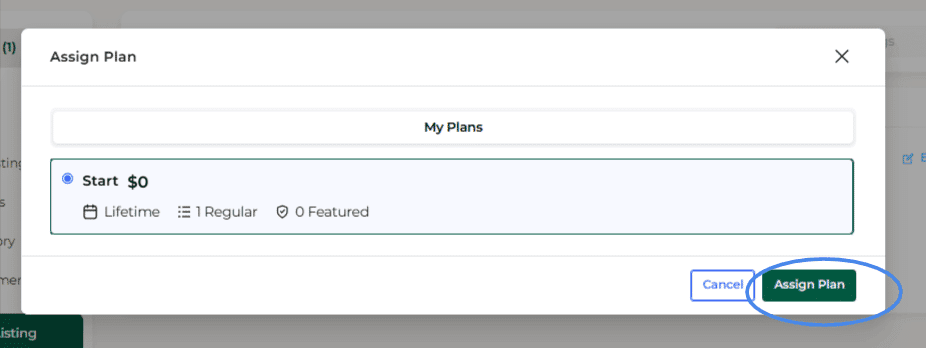
Plan Assignment Modal

Edit and Review #

After assigning the plan, you will be taken back to your dashboard. You should now see that the listing has a plan assigned but is now listed as “In Review”. This is because we review all new and updated listings before they can be live on our platform. Each time you make an update, the updates will be reviewed to make sure the listing stays appropriate for our platform.

By claiming and assigning a plan to the listing, you have indicated that you have now taken full ownership of the listing. Even if you have not made changes, the platform will still place the listing in review. Don’t worry all listings reviews take place within 24 hours but in most cases it will be much quicker than that.

In the meantime, take the chance to review the listing we created originally and make any changes that you feel are needed. If you purchased a paid plan and upgraded the listing, you will have additional fields, such as business hours, to complete. If you make all your changes at this point, your listing will be ready to go live once we make our review.

That’s it. You’re done. You’ve claimed, edited, and published your listing on Kinetic Market. Go tell your customers and social media to check it our and leave you a review


.

Updated on September 15, 2026
listing listings

What are your Feelings

  • Happy
  • Normal
  • Sad
How to add a listingHow to add a listing

Leave a ReplyCancel Reply

You must be logged in to post a comment.

Table of Contents
  • Create or login to your account
  • Search for your business name
  • Click the claim listing button
  • Complete the claim form
  • Wait for approval
  • Subscribe to a plan
  • Add listing to plan
  • Edit and Review

Site Navigation

  • Browse Categories
  • Browse All Businesses
  • Business Map
  • From Kinetic Market
  • Mobile App

Get Involved

  • Add Your Business
  • Recommend a Business
  • Manage Your Plan
  • Black Business Pledge

Helpful Links

  • About
  • FAQs
  • Contact
  • Help
  • Terms and Conditions
  • Privacy Policy
  • Verification & Badge Policy

Copyright © 2026 - Kinetic Market 

Change Location
Find awesome listings near you!
Search Kinetic Market
Find businesses, events, and more.
Category